Choosing an imaging platform is not simply a storage decision. Healthcare organizations must determine how studies move from modalities into a controlled archive. They must also assess how clinicians and imaging teams access them and how the system behaves when connectivity, identity services, or a primary site is unavailable.
Cloud based medical imaging is a deployment model in which image storage, workflow services, and viewing access are delivered through cloud infrastructure, usually alongside a local DICOM gateway. The right choice depends on validated interoperability, security controls, performance, recovery objectives, and a migration plan that protects access to prior studies.
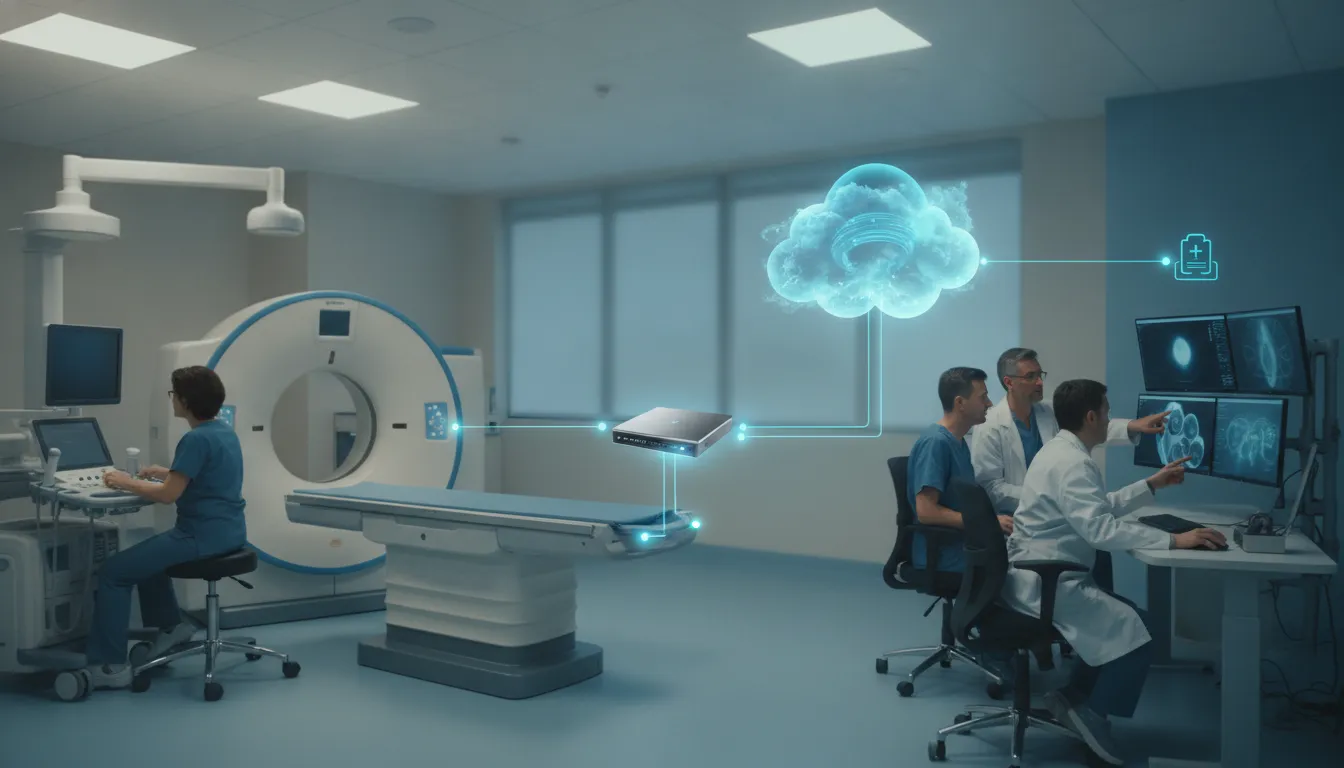
Before comparing vendors, map the architecture behind those promises. A vendor-neutral cloud PACS model described in the peer-reviewed literature separates the cloud platform, which manages long-term archiving and data flow, from an access device that provides the local DICOM interface and gateway. That distinction gives buyers a practical framework for evaluating how the pieces work together.
How Cloud Based Medical Imaging Fits a Modern PACS Architecture
Cloud based medical imaging is not simply a local picture archiving and communication system (PACS) moved to a remote server. It is an operating model that separates image services, storage, access, and local connectivity so healthcare organizations can evaluate each layer against workflow and governance needs.
A useful reference point is a vendor-neutral architecture described in a peer-reviewed study. The model divides the environment into a cloud platform and an access device. The cloud platform manages nearline, or long-term, image archiving, data flow, and backend management. The access device provides the local Digital Imaging and Communications in Medicine (DICOM) interface and acts as a gateway to cloud services. Read the architecture study in PMC.
The cloud platform is not the same as the local gateway
That distinction matters during procurement. A gateway or access device may sit inside a hospital or imaging center, receive studies from modalities, and communicate with existing equipment using DICOM. It can manage local connectivity without making the entire archive, viewer, or workflow engine a local installation. The cloud platform then provides the centralized services that support storage, routing, access, and administration.
Buyers should therefore ask where each function runs and what happens if the network connection is interrupted. Questions should cover local queueing, study reconciliation, identity and access control, audit records, backup ownership, and the process for exporting data. A diagram that shows only a cloud icon does not answer those operational questions.
Architecture should scale with the imaging workflow
In the cited study, the cloud PACS was tested with image traffic from computed tomography, magnetic resonance, and computed radiography modalities. The authors also reported that performance increased with more parallel connections, while the tested monolithic server did not show the same behavior. That finding is not a universal performance guarantee. It does illustrate why buyers should evaluate scaling evidence using their own modality mix, concurrent users, study volume, and geographic footprint.
For a broader buyer view, compare the proposed design with the organization’s needs for cloud PACS architecture and routing. Teleray provides software for imaging and radiology workflows; it does not perform radiology reads. The architecture decision is ultimately about how reliably the right people, systems, and studies connect while the organization retains clear control over data and clinical operations.
How Does Cloud Based Medical Imaging Move DICOM Data?
A reliable workflow starts at the imaging modality and ends with authorized access to the correct study. DICOM, or Digital Imaging and Communications in Medicine, is both the file format and communication protocol used to move imaging data between compatible systems. PACS, or picture archiving and communication system, coordinates acquisition, storage, retrieval, and review. The exact sequence varies by organization, but buyers should be able to trace every handoff.
- Acquire the study. A CT, MRI, ultrasound, radiography, or other modality creates the study and associates it with patient and order information. Where supported, a DICOM Modality Worklist supplies scheduled patient and procedure details to reduce manual entry and help standardize identifiers.
- Pass data through a gateway. A local DICOM gateway or access device receives the study from the modality, validates the connection, and securely passes it toward the cloud service. This gateway can preserve local workflow while separating modality connectivity from the cloud platform.
- Route and archive the images. Configured routing rules send studies to the appropriate archive, site, department, or downstream application. The platform should document how it handles failed transfers, duplicate studies, and interrupted connections. Confirm whether routing can support multiple facilities and modality types.
- Connect operational systems. The imaging workflow can exchange scheduling, patient, order, and status information with a radiology information system (RIS) or electronic medical record (EMR). Healthcare buyers commonly evaluate HL7 interfaces, application programming interfaces (APIs), and bidirectional status handling alongside DICOM connectivity. These integrations should be tested with representative workflows, not assumed from a feature list.
- Retrieve and review the study. Authorized users retrieve current or prior studies through Query/Retrieve functions and open them in a diagnostic or clinical viewer. Review access may be browser-based, workstation-based, or both. Verify identity controls, audit records, and how prior studies are matched before approving the workflow.
Ask vendors to diagram this complete path, including worklist population, routing exceptions, archive retention, RIS and EMR handoffs, and export procedures. Teleray lists DICOM 3.0, configurable routing, Query/Retrieve, and Modality Worklist support among its cloud imaging capabilities, but implementation scope should be confirmed for each environment. EMR and EHR integration capabilities should be evaluated alongside the imaging workflow, not as a separate afterthought.
What Security Questions Should Healthcare Buyers Ask?
Security evaluation should test how a vendor protects imaging data in practice, not simply collect compliance badges. Ask whether the vendor will sign a Business Associate Agreement (BAA), which HIPAA safeguards apply to the service, and which responsibilities remain with your organization. A BAA documents obligations, but it does not make either party compliant by itself.
How is access controlled and monitored?
Require a clear identity and access model. Ask whether multi-factor authentication (MFA) is available or mandatory, how role-based access control limits users to appropriate studies and functions, and how privileged access is reviewed. Confirm whether the platform records audit logs for sign-ins, study views, downloads, sharing, configuration changes, and administrative actions. Also ask how long logs are retained, who can review them, and whether they can be exported for investigations or compliance workflows.
Customer isolation deserves specific attention in a multi-tenant environment. Ask how one healthcare organization’s data is separated from another’s, how storage and backup boundaries are enforced, and how access is tested after upgrades or configuration changes. Teleray’s compliance materials list customer isolation, audit logging, mandatory MFA, and role-based access control as platform controls. Buyers should verify the applicable configuration and contract rather than treating a feature list as a deployment guarantee.
Where is data stored, and who shares responsibility?
Data residency can affect contracts, procurement, and regulatory obligations. Ask where primary data, backups, and logs are stored; whether support personnel can access them from other jurisdictions; and what happens when data is exported or deleted. Teleray’s compliance materials describe SOC 2 Type II, HIPAA safeguards, signed BAAs, and US-only data centers. Confirm that those arrangements meet your organization’s geographic and legal requirements.
Finally, document the shared-responsibility boundary. Your team may still control identity governance, workstation security, user training, local network protections, and appropriate disclosure of images. Review healthcare security and compliance controls alongside the vendor’s BAA, audit evidence, incident-response process, and exit procedures before approving a cloud based medical imaging platform.
Cloud, On-Premise, or Hybrid: Which Model Fits?
The right deployment model depends less on a preference for new technology than on how your organization manages control, connectivity, continuity, and change. A cloud model can reduce local infrastructure responsibility, while an on-premise model may suit organizations with established data-center operations and strict local control requirements. A hybrid design can preserve selected local workflows while moving shared access or archive functions to cloud infrastructure.
Use the comparison below as a starting point for an imaging architecture review. The decision should account for server location, bandwidth, integration, maintenance, downtime, backup, and disaster recovery, all of which are recognized PACS deployment considerations.
Cloud, on-premise, and hybrid medical imaging operating models
| Decision area | Cloud | On-premise | Hybrid |
|---|---|---|---|
| Control | Provider manages much of the platform; contract, access, and residency terms require review. | Organization controls local infrastructure, configurations, and physical environment. | Control is divided between local systems and contracted cloud services. |
| Scaling | Capacity can be expanded without sizing every new local server. | Growth may require procurement, installation, and data-center capacity. | Scale each workload according to its location and operational need. |
| Access | Remote and multi-site access depends on reliable connectivity and identity controls. | Local access may be predictable, but external access needs deliberate design. | Users may access both environments, with routing and permissions carefully coordinated. |
| Resilience | Review backup, redundancy, recovery objectives, and downtime procedures in the agreement. | Internal teams own backup, recovery, updates, and continuity testing. | Test failure modes across both environments, including network and interface dependencies. |
| Migration | Requires data mapping, validation, connectivity testing, and controlled cutover. | May limit immediate change but still requires interface and archive planning. | Requires a clear boundary for which studies, workflows, and interfaces remain local. |
| Operational ownership | Shared responsibility must be defined for security, support, monitoring, and incidents. | Internal IT and imaging teams carry most platform responsibilities. | Ownership must be documented across vendors, internal teams, and integration partners. |
There is no universally superior model. Ask prospective vendors to demonstrate how the selected architecture handles a network interruption, a failed interface, a new imaging site, and a recovery test. Those scenarios reveal more about operational fit than a deployment label alone. Review Teleray’s healthcare imaging solutions alongside your own operating requirements before selecting a model.
What Should a Cloud Imaging Migration Plan Include?
A migration to cloud based medical imaging should be managed as a clinical-workflow and data-governance project, not simply a storage transfer. Start by creating an inventory of modalities, studies, viewers, interfaces, locations, user groups, retention rules, and downstream systems. Include legacy archives and identify which data must remain immediately searchable, which can be moved in stages, and which requires review before transfer.
Build and validate the migration foundation
Map patient, encounter, accession, study, series, and image identifiers across the existing PACS, RIS, EMR, and target platform. Document how DICOM metadata will be preserved or corrected, then test representative studies from every modality. Validation should cover image integrity, priors, annotations, compression, viewer behavior, routing, and worklist matching. Do not approve a migration based only on successful file transfer.
Define identity and access before users enter the new environment. Assign roles by job function and location, establish multifactor authentication (MFA) requirements, and document how accounts are created, changed, audited, and disabled. Confirm data residency, business associate agreement terms, audit-log access, backup scope, recovery objectives, and export formats in the contract. Teleray describes dedicated customer storage and DICOM routing among its listed capabilities. Verify the applicable configuration, redundancy design, and recovery commitments in the proposed agreement.
Prove the workflow before cutover
Use a representative pilot with radiologists, technologists, clinicians, imaging administrators, and IT staff. Test acquisition, query and retrieve, prior-study access, EMR and RIS handoffs, multi-site sharing, downtime procedures, and support escalation. Reconcile source and target counts, identifiers, study status, and exception logs. A comparison of backup, disaster recovery, training, and existing-system integration should be part of the transition review, not an afterthought. Cloud PACS architecture and routing can provide additional context for these questions.
Prepare role-specific training and a cutover runbook, including change ownership, communication, rollback criteria, and post-cutover monitoring. Finally, document the exit plan before signing: how the organization can retrieve DICOM studies and metadata, preserve audit history, validate an export, and securely retire the legacy environment. A migration is complete only when the organization can operate the new workflow and demonstrate control over its data.
How Should Buyers Evaluate Access, Performance, and Disaster Recovery?
Start with the realities of daily access. Browser-based viewers can allow authorized users to review images remotely without installing dedicated PACS software, but “anywhere access” is not the same as reliable access. Ask vendors which browsers and devices are supported, how identity is verified, and what happens when a site has limited connectivity. Bandwidth is a core performance consideration, particularly for organizations sharing studies across rural facilities, outpatient centers, and hospitals.
Request test results using representative study sizes and modalities, not only a standard demonstration case. Confirm whether the platform supports resumable transfers, prioritization, adaptive image quality, or background study transfer. Buyers should validate how those features behave in their own network conditions and document the applicable service commitments.
Translate recovery language into measurable obligations
Do not accept “redundant” or “highly available” as a recovery plan. Ask where primary and replicated data are held, how backups are isolated, how restoration is tested, and how the vendor reports failed or incomplete jobs. Define the recovery time objective (RTO), the maximum acceptable time to restore service. Define the recovery point objective (RPO), the maximum acceptable amount of data that could be lost. Also document downtime procedures, escalation contacts, maintenance notices, and how users access or reconcile studies during an outage.
Teleray describes Azure-based infrastructure and dedicated customer storage silos. Confirm redundancy, failover, scaling, and recovery time objective (RTO) commitments against the proposed agreement, including scope, exclusions, testing frequency, and site-specific obligations. For multi-site operations, test failover and study sharing across locations, then verify that permissions, audit trails, and reconciliation remain consistent after recovery. Training and onboarding should cover both routine access and the documented downtime workflow. The related guide to medical image storage and collaboration provides useful workflow context.
Which Integration Questions Belong in an Imaging RFP?
An imaging request for proposal should test the complete workflow, not simply ask whether a vendor supports DICOM. Require each respondent to describe how studies move from modality to archive, viewer, RIS, and EMR. Ask what happens when an interface or network connection is unavailable.
- Standards and modality connectivity: Which DICOM services and transfer syntaxes are supported? Can the platform provide DICOM Store, Query/Retrieve, Modality Worklist, and, where relevant, Modality Performed Procedure Step (MPPS)? Ask how configurable routing rules are managed and validated across CT, MRI, ultrasound, and other modalities.
- EMR, RIS, and application interfaces: Does the solution support Health Level Seven (HL7) v2, Fast Healthcare Interoperability Resources (FHIR), REST or SOAP APIs, SMART on FHIR, and file-based interfaces? Request representative workflows for orders, demographics, results, status updates, and single sign-on rather than accepting a standards list without implementation detail. Review Teleray’s EMR and EHR integration capabilities for an example of the questions these connections should address.
- Identity and governance: How are users provisioned, deprovisioned, and assigned least-privilege roles? Confirm support for multifactor authentication (MFA), directory or identity-provider integration, session controls, audit logs, and access reporting. Ask who can view, export, or share studies and how those actions are recorded.
- Operations and support: Define monitoring, escalation paths, service ownership, downtime procedures, training, and support coverage. Ask for recovery objectives, backup responsibilities, testing evidence, and the process for reconciling studies after an interruption. The vendor should also explain performance expectations for remote and multi-site users.
- Data control and contract scope: Where is data stored, including backups and replicas? Which jurisdictions apply? Can the organization export DICOM studies, metadata, audit records, and configuration in usable formats if the contract ends? Put retention, deletion, breach response, Business Associate Agreement (BAA), security responsibilities, and any stated recovery objective in the agreement. For broader context, compare the vendor’s answers with Teleray’s cloud PACS architecture and routing.
These questions turn cloud based medical imaging from a feature comparison into a verifiable integration and governance decision. Teams can also review Teleray’s radiology imaging software capabilities when mapping the intended workflow.
Frequently Asked Questions
What should a healthcare organization verify before choosing a cloud PACS?
Verify how the platform isolates patient data, where data is stored, how identity and role-based access are managed, and whether audit logs support your governance requirements. Confirm the Business Associate Agreement, applicable HIPAA safeguards, data-residency obligations, backup design, recovery objectives, data export process, and support responsibilities in writing.
How does DICOM work in cloud based medical imaging?
Digital Imaging and Communications in Medicine, or DICOM, is the standard used to format and exchange imaging studies. A modality or local gateway sends studies through DICOM routing to the cloud archive. Query/Retrieve, Modality Worklist, and related workflow services then help users find studies and connect imaging operations with radiology information systems and electronic medical records.
Can clinicians access cloud imaging from different locations?
Many cloud imaging platforms provide browser-based viewing, but buyers should test the complete workflow on approved devices, networks, and display configurations. Ask how the system handles limited bandwidth, resumable transfers, study prioritization, local downtime, and access to prior studies before treating remote access as an operational benefit.
What should a cloud imaging migration plan include?
Start with an inventory of modalities, studies, interfaces, users, retention rules, and data dependencies. Then map identifiers, validate DICOM transfers, pilot representative studies, reconcile counts and metadata, train users. Define cutover and downtime procedures, and document how the organization can export data if its requirements or vendor relationship changes.
Schedule a Demo for Your Cloud Imaging Evaluation
A focused conversation can help your team connect cloud PACS architecture, security requirements, migration planning, and integration priorities to the realities of your imaging workflow. Bring your questions about DICOM routing, access, storage, disaster recovery, and vendor responsibilities.
Schedule a demo to discuss your cloud based medical imaging evaluation with the Teleray team.